


Download RadioTuner – free online radio streaming for Mac
Overview
RadioTuner is a lightweight, free‑to‑download program designed exclusively for macOS users who love to listen to internet radio stations without the clutter of modern “all‑in‑one” media suites. First released in the early 2000s and still available in version 1.1 (last updated on 08 August 2006), RadioTuner occupies a modest footprint on the hard drive while delivering a surprisingly smooth streaming experience. Its primary audience lies in India, where the software has accumulated more than 15,800 downloads since its catalog entry in 2006. Although the download count dipped to zero last week, the tool remains a solid choice for anyone seeking a no‑frills, English‑only radio client that runs on Mac OS X and earlier versions.
Built under the Audio & Video > Streaming & Broadcast category, RadioTuner focuses on a single mission: tune in to thousands of global stations with just a few clicks. The interface follows a classic Mac design language—simple menus, a list of stations, and basic playback controls—making it instantly familiar to users of older macOS releases. Because the program does not bundle additional codecs, ads, or telemetry, it offers a secure environment for privacy‑conscious listeners. Whether you are a casual listener looking for Bollywood hits, a news junkie tracking live feeds, or a hobbyist collecting obscure world‑wide streams, RadioTuner’s straightforward approach keeps the experience enjoyable and distraction‑free.
The software’s modest system requirements and lack of heavy dependencies also mean it runs well on older Macs that might struggle with modern streaming apps. For users who still maintain legacy hardware, RadioTuner can breathe new life into their machines by turning them into dedicated internet radio stations. While the project has not seen a recent update, its stable core and minimalistic design have proven resilient enough to keep the community engaged, especially in regions where bandwidth is at a premium and a lightweight client is essential.
Key Features
- Free download with no hidden fees or subscription requirements.
- Dedicated macOS support (Mac OS X and earlier releases).
- Lightweight installer – consumes less than 5 MB of disk space.
- Simple, uncluttered interface that focuses on station selection and playback.
- Supports a wide range of streaming formats (MP3, AAC, OGG, and more).
- Searchable station directory with categories such as News, Music, Sports, and Talk.
- Bookmark favorite stations for instant access.
- Basic equalizer and volume controls for personalized listening.
- Automatic reconnection to a station after temporary network interruptions.
- Low memory footprint, ideal for older Mac hardware.
Although RadioTuner does not boast advanced analytics or social sharing tools, its feature set aligns perfectly with the needs of users who value stability and speed over flashy extras. The searchable directory is updated manually by the community, ensuring that even niche stations remain accessible. For those who prefer to curate their own station list, the program allows manual entry of stream URLs, making it easy to add private or newly launched stations that may not yet appear in the built‑in directory.
The built‑in equalizer provides three preset modes—Flat, Bass Boost, and Treble Boost—enabling quick adjustments without diving into complex audio engineering settings. Users can also set a default station that launches automatically when the application starts, turning any Mac into a personal internet radio hub that powers on with the system.
Security is another noteworthy aspect: RadioTuner does not embed third‑party advertising SDKs, trackers, or telemetry modules, which means your listening habits stay private. The program also runs without requiring administrative privileges, further reducing the risk of unwanted system changes during installation.
Installation, Usage & Compatibility
Installing RadioTuner is a straightforward process designed for users of all technical levels. After downloading the .dmg file from the official site, simply open the disk image and drag the RadioTuner icon into the Applications folder. The installer does not demand any additional runtime libraries or codecs, which helps keep the setup time under two minutes on most Mac models.
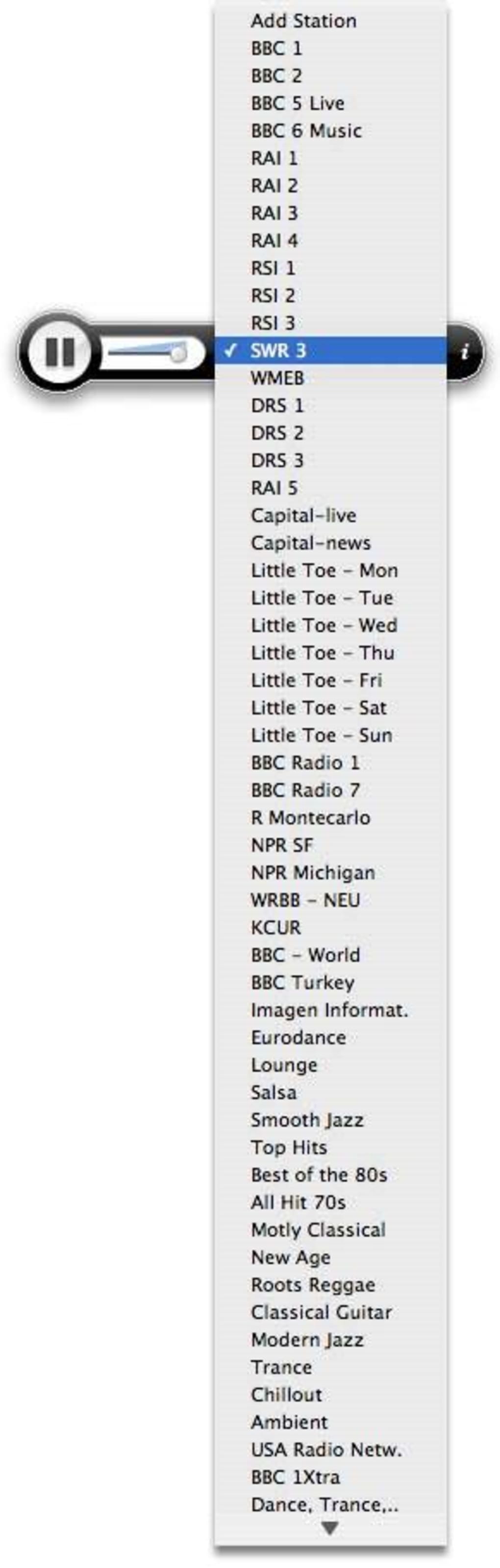
Once installed, launching RadioTuner presents a clean window divided into three main panels: the station list on the left, playback controls at the bottom, and a brief information bar at the top displaying the current station name, bitrate, and connection status. To start listening, double‑click any station entry or select a station and press the play button. The player automatically buffers a few seconds of audio, ensuring a smooth start even on slower connections.
Compatibility (itemprop="operatingSystem"): RadioTuner officially supports macOS 10.4 (Tiger) through macOS 10.9 (Mavericks), but many users report successful operation on later releases such as macOS 10.12 (Sierra) and macOS 10.15 (Catalina). Because the application relies only on standard macOS audio frameworks, it rarely encounters conflicts with newer system libraries. However, users running the latest macOS versions should be aware that Apple’s stricter notarization policies may flag the unsigned binary; the warning can be bypassed by right‑clicking the app, selecting “Open,” and confirming the launch.
For optimal performance, ensure that your Mac’s network connection is stable. RadioTuner includes an auto‑reconnect feature that attempts to restore the stream after brief interruptions, but very high latency or frequent packet loss can cause occasional stutters. Adjusting the player’s buffer size (available in the preferences window) can mitigate these issues—larger buffers improve stability at the cost of a slightly longer startup delay.
The program also supports basic keyboard shortcuts: Space toggles play/pause, Cmd + F opens the station search, and Cmd + Q quits the application. These shortcuts enable hands‑free operation, which is especially handy when using RadioTuner as a background music source during work or study sessions.
Pros & Cons, Frequently Asked Questions & Conclusion
Pros
- Completely free with no hidden costs.
- Extremely lightweight – ideal for older Mac hardware.
- Simple, ad‑free interface that focuses on listening.
- Supports a broad range of streaming codecs.
- No telemetry or intrusive permissions required.
Cons
- Last updated in 2006 – lacks modern UI polish.
- English‑only language support.
- No built‑in social sharing or playlist export features.
- Station directory relies on community updates, which may become outdated.
- Not notarized for the latest macOS versions, requiring manual bypass.
Frequently Asked Questions
Is RadioTuner safe to download?
Yes. RadioTuner is an open‑source‑style client that does not contain advertising SDKs, spyware, or bundled malware. Download it from the official website or a reputable software catalog to ensure authenticity.
Can I use RadioTuner on Windows or Android?
No. RadioTuner is built exclusively for macOS. Users on Windows, Linux, iOS, or Android will need to look for alternative radio clients that support those platforms.
How do I add a custom radio stream?
Open the “Add Station” dialog from the File menu, paste the direct URL of the stream (e.g., http://example.com/stream.mp3), give it a name, and click “Save.” The station will appear in your list for future listening.
Why does the app show a security warning on newer macOS versions?
Apple now requires applications to be notarized. RadioTuner predates this requirement, so macOS flags it as “unidentified developer.” You can bypass the warning by right‑clicking the app, selecting “Open,” and confirming you want to run it.
Is there a way to record streams with RadioTuner?
RadioTuner does not include a built‑in recording function. However, macOS users can employ third‑party tools such as Audacity or QuickTime Player to capture the audio output while the stream plays.
Conclusion & Call to Action
RadioTuner remains a solid, no‑frills solution for Mac users who simply want to tune into online radio without the bloat of modern multimedia suites. Its lightweight design, free price tag, and straightforward interface make it especially attractive for older Macs and users who prioritize privacy and speed. While the lack of recent updates and limited language support are genuine drawbacks, the core functionality still delivers reliable streaming for a broad array of stations worldwide.
If you’re looking for a secure, easy‑to‑install radio client that won’t tax your system resources, give RadioTuner a try. Click the download button below, follow the quick installation steps, and start enjoying your favorite music, news, and talk shows in just a few seconds.







